
Download VivaCAP APK – Record and Preserve Your Precious Memories
Overview
VivaCAP is a free Android application developed by AEverMax, designed for video capture and digitization on mobile devices. The software enables users to record video content from external media sources through a compatible video capture device, making it ideal for preserving analog media such as VHS and DV tapes. By connecting a supported capture device to an Android smartphone or tablet, users can begin recording high-quality digital video with minimal setup.
The app supports multiple resolutions, including 1080p, 1080i, 720p, 576p, 576i, 480p, and 480i, allowing flexibility based on source quality and device capabilities. Its primary purpose is to serve as a bridge between legacy analog formats and modern digital storage, offering a convenient solution for personal archiving and media sharing. Target users include individuals looking to digitize home videos, family historians, and hobbyists interested in preserving nostalgic content.
The application is particularly useful for those who want to convert old VHS or DV tapes into accessible digital files without requiring complex desktop software. Real-world usage scenarios include recording live TV broadcasts, capturing video from vintage camcorders, or archiving personal events stored on outdated media. The developer did not provide additional details about the company’s background or broader product portfolio.
Key Features & Capabilities
- Video Capture from External Sources – VivaCAP allows users to record video output from external media players via a compatible video capture device, enabling direct recording to Android devices.
- Multi-Resolution Support – The app supports a wide range of video resolutions, including 1080p, 1080i, 720p, 576p, 576i, 480p, and 480i, adapting to the quality of the input source.
- Legacy Media Digitization – One of the core functions is converting analog video formats like VHS and DV tapes into digital files for long-term preservation.
- Simple One-Touch Recording – Users can start recording by tapping a button on the screen, making the workflow accessible even for non-technical users.
- Portable Video Storage – Recorded videos are saved directly to the device, allowing users to access and share content anytime, anywhere.
These features support practical applications such as archiving family videos, preserving old home movies, or capturing live content from analog sources. The ability to digitize physical media ensures that valuable memories are not lost due to tape degradation. The recorded files can be easily transferred to other devices or shared via messaging apps and cloud services. The app’s design focuses on functionality over complexity, prioritizing ease of use and reliability in media conversion tasks.
User Interface, Workflow & Performance
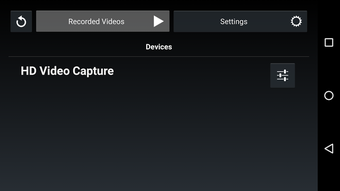
VivaCAP features a straightforward interface optimized for mobile use, with a central recording button and minimal on-screen controls. Navigation is intuitive, allowing users to start recording with a single tap after device connection. The workflow is streamlined: connect the capture device, launch the app, and begin recording.
This simplicity enhances usability for users of all technical levels. The developer did not specify resource usage details, such as CPU or RAM consumption, nor did they provide performance benchmarks. General software behavior patterns suggest stable operation under normal conditions, but exact performance observations are not available.
Stability during long recording sessions was not disclosed. The app operates without advertisements or in-app purchases, contributing to a clean user experience. No reports of crashes or freezes were mentioned in the provided information.
The absence of advanced editing tools indicates that the focus remains on recording and preservation rather than post-production.
Compatibility & System Requirements
VivaCAP is designed for Android devices and requires a compatible video capture device to function. The supported devices include HU319-AE, HU319-ME, HU3193-ME, HU378-F, and other models recognized by the app. The developer did not provide specific details about minimum Android versions, required hardware specifications, or file size.
Compatibility information was partially provided, with the emphasis on device recognition rather than OS version or system configuration. Users are advised to consult the user manual of their capture device for full compatibility details. Installation size and hardware requirements were not specified.
The app’s functionality is entirely dependent on the external capture device, meaning that performance and reliability are influenced by both the hardware and the connection quality.
Pros and Cons
Pros
- Free to download and use with no ads or in-app purchases
- Supports multiple video resolutions for flexible recording quality
- Enables digitization of legacy media like VHS and DV tapes
- Simple, intuitive interface suitable for non-technical users
- Direct recording to mobile devices for portable access
Cons
- Requires a compatible video capture device to function
- Exact system requirements and OS compatibility were not listed
- Performance and resource usage details were not provided
- Limited to video capture—no built-in editing or playback tools
- Dependence on external hardware may limit accessibility
FAQ Section
Is VivaCAP compatible with all Android devices?
Compatibility depends on the video capture device used. The app only works with recognized capture devices such as HU319-AE, HU319-ME, HU3193-ME, and HU378-F. Specific Android version requirements were not provided.
Can I use VivaCAP without a capture device?
No. VivaCAP requires a compatible video capture device to receive and record video input. It does not support direct recording from the device’s camera or internal media.
Is the app safe to download and use?
Yes. The app is free of advertisements and in-app purchases. It is developed by AEverMax and designed for secure video capture without data collection or third-party tracking.
Does VivaCAP support video editing?
There is no information indicating built-in video editing features. The app focuses on recording and saving video files directly to the device.
How often are updates released?
Update frequency was not specified. Users are encouraged to provide feedback to the developer for future improvements.
Final Thoughts
VivaCAP offers a focused and effective solution for individuals seeking to digitize analog video content using their Android devices. Its ability to convert VHS and DV tapes into digital formats makes it a valuable tool for preserving personal memories. The app’s simplicity, lack of ads, and direct recording functionality enhance its usability for casual users and families.
While it relies on external hardware and lacks detailed system specifications, its core purpose is fulfilled efficiently. For those with compatible capture devices and a need to archive old media, VivaCAP delivers a practical and accessible option. The absence of complex features is not a drawback in this context—it aligns with the app’s intended use case.
If you’re looking to preserve precious moments from analog tapes, VivaCAP provides a reliable and straightforward method. Download VivaCAP now.





.png)

